Detecting malware on file servers
File servers, which are central components of IT infrastructures, are prime targets for cyberattacks, particularly through malware injection. It is essential not only to detect malware quickly before it spreads, but also to identify any latent threats that have already been planted on the server.
File servers: a prime target for attackers
File servers centralize your organization’s critical data and are accessible to many users via network drives, desktop syncs, or FTP repositories. This greatly increases their exposure to cyber threats. An employee uploading an infected file from their workstation, a sync from a compromised device, or an import from an external source: there are many entry points, and they are often unmonitored. Traditional antivirus software installed on workstations does not protect the server itself, and signature-based solutions fail to detect unknown or obfuscated threats.

Silent Accumulation
Without continuous analysis, threats accumulate on your servers undetected by traditional antivirus software.
Compromised Backups
During an attack, the backups themselves can become infected, compromising your ability to recover.
Complex recovery
Post-incident recovery requires analyzing millions of files to establish a trusted core.
The risk of dormant malware in your storage spaces
Every file uploaded by a user, synced from a device, or imported from an external source poses a potential risk. Modern malware uses advanced evasion techniques: obfuscation, polymorphism, and payload encryption. It evades traditional antivirus signatures and waits for the right moment to activate. During a ransomware cyberattack, it is common for malicious files to have been present in the infrastructure for a long time.
Proactive monitoring for healthy file servers
GLIMPS Malware for Data Security continuously monitors your directories and scans every new file or modification through multiple integration options: ICAP, the GLIMPS Malware API, or our dedicated agent (the Host Connector). More than 25 detection engines, including our proprietary artificial intelligence, identify known and unknown threats in seconds. Malicious files are automatically quarantined in encrypted storage or deleted, depending on your policy. You can also run full scans to detect existing threats and clean up your existing file inventory.
A file uploaded to the server is automatically scanned and secured
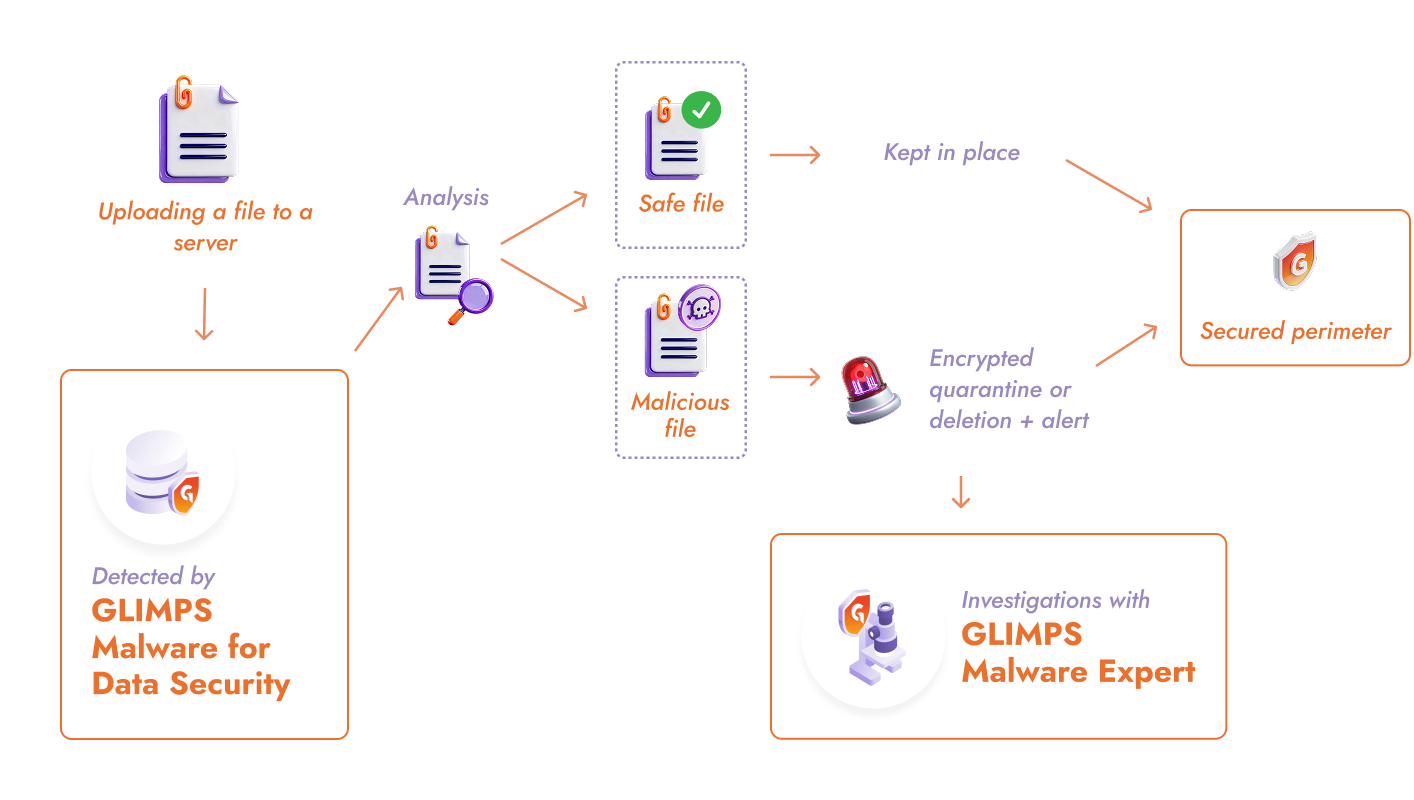
Ensure the integrity of the data stored on your servers
The security of your organization depends, in part, on the assurance that the files stored on your servers are clean and remain so over time. GLIMPS Malware for Data Security detects dormant threats on your servers and blocks new malware in real time, regardless of the entry vector. Every file uploaded by a user, synced from a workstation, or imported from an external source is verified before being permanently integrated into your infrastructure.
Your backups remain clean because they contain only pre-scanned files: in the event of an attack, you retain the ability to restore a trusted environment.
The complete scan history in GLIMPS Malware Expert allows you to quickly identify the compromised scope during an incident, trace the origin of an infection, and document your actions for post-incident audits. Your ability to recover is preserved with an established trust core. You significantly reduce recovery time objective (RTO) and limit the operational impact of a compromise.
GLIMPS protects your file servers from cyber threats
GLIMPS Malware for Data Security
Scans every file uploaded to your servers in real time.
- Continuous monitoring
- Over 25 detection engines, including proprietary AI
- Scans each file in seconds

GLIMPS Malware Expert
Conduct investigations based on files analyzed by GLIMPS Malware for Data Security.
- Contextualized, actionable findings
- Scan history, statistics
- Configurable alerts upon detection
Day-to-day questions
No, the solution is designed to be lightweight. Analysis is performed via API calls to the GLIMPS Malware platform, minimizing the CPU and memory load on the server. For more information, visit the dedicated page.
Yes, you can set up scheduled scans at the frequency and times of your choice to scan all existing files without disrupting operations.
Yes, it can monitor any directory accessible from the server, including network mounts to NAS or SAN devices.
Malicious files are moved to an encrypted quarantine folder that is inaccessible to users. They can be restored if necessary or permanently deleted, depending on your security policy.
Secure your file servers and prevent incidents
Schedule a personalized demo with a GLIMPS expert
Request a demo