Automate doubt removal in cybersecurity
Your employees are flagging suspicious files, and your tools are generating alerts that need to be investigated. Your security team is spending more and more time responding to these requests, most of which turn out to involve perfectly legitimate files. How can you handle this volume without tying up your experts in repetitive tasks?
Employee detection tools and reports: two streams of information to process in order to resolve any doubts
Cybersecurity in our professional environments is improving—that’s a fact. And of course, this is primarily in response to an ever-growing and increasingly sophisticated threat. The impact on security teams is immediate, with a significant increase in the number of tickets that SOC analysts and other security teams must process daily. Does addressing all these tickets really require the involvement of one or more cybersecurity experts?
The rapid increase in requests for verification ties up qualified resources on tasks that could be automated: file retrieval, analysis, drafting the verdict, and notification.
At the same time, security tools (EDR, SIEM, XDR, etc.) generate a massive volume of alerts that must be sorted and triaged. According to Vectra, a SOC analyst receives an average of 200 alerts per day, and 67% of them are never addressed due to lack of time.

Automate triage and reserve expert review for confirmed incidents
Malware detection can be centralized and automated using GLIMPS Malware, tailored to your needs and existing workflows. For example:
-
Employees can submit files independently
Through the GLIMPS Malware Kiosk portal, they can have a suspicious file analyzed in seconds and receive a straightforward verdict (clean or malicious). This process requires no cybersecurity expertise. If the file is malicious, an alert is automatically sent to the security team, which can investigate further in GLIMPS Malware Expert.
-
File analysis based on EDR alerts
GLIMPS Malware integrates with your EDR so that every suspicious file triggering an alert is automatically analyzed. As a result, the analyst can focus on a scope that has already been qualified thanks to an enriched, contextualized, and actionable verdict, allowing them to resolve any doubts quickly. Learn more about GLIMPS Malware for EDR.
-
Reporting a suspicious email directly from Outlook
When an employee receives a suspicious email, they may be unsure how to proceed. Should they delete it? Forward it? The GLIMPS button integrated into Microsoft Outlook makes reporting simple. Employees can trigger a scan with a single click, without leaving their email client and with no technical requirements. The plugin automatically submits any attachments and links contained in the email to the GLIMPS Malware scanning engines and displays a clear verdict: safe or malicious. If a threat is confirmed, the alert is automatically escalated to the security team, who can view the full context in GLIMPS Malware Expert to investigate.
A submitted file, automatic verification, and full traceability
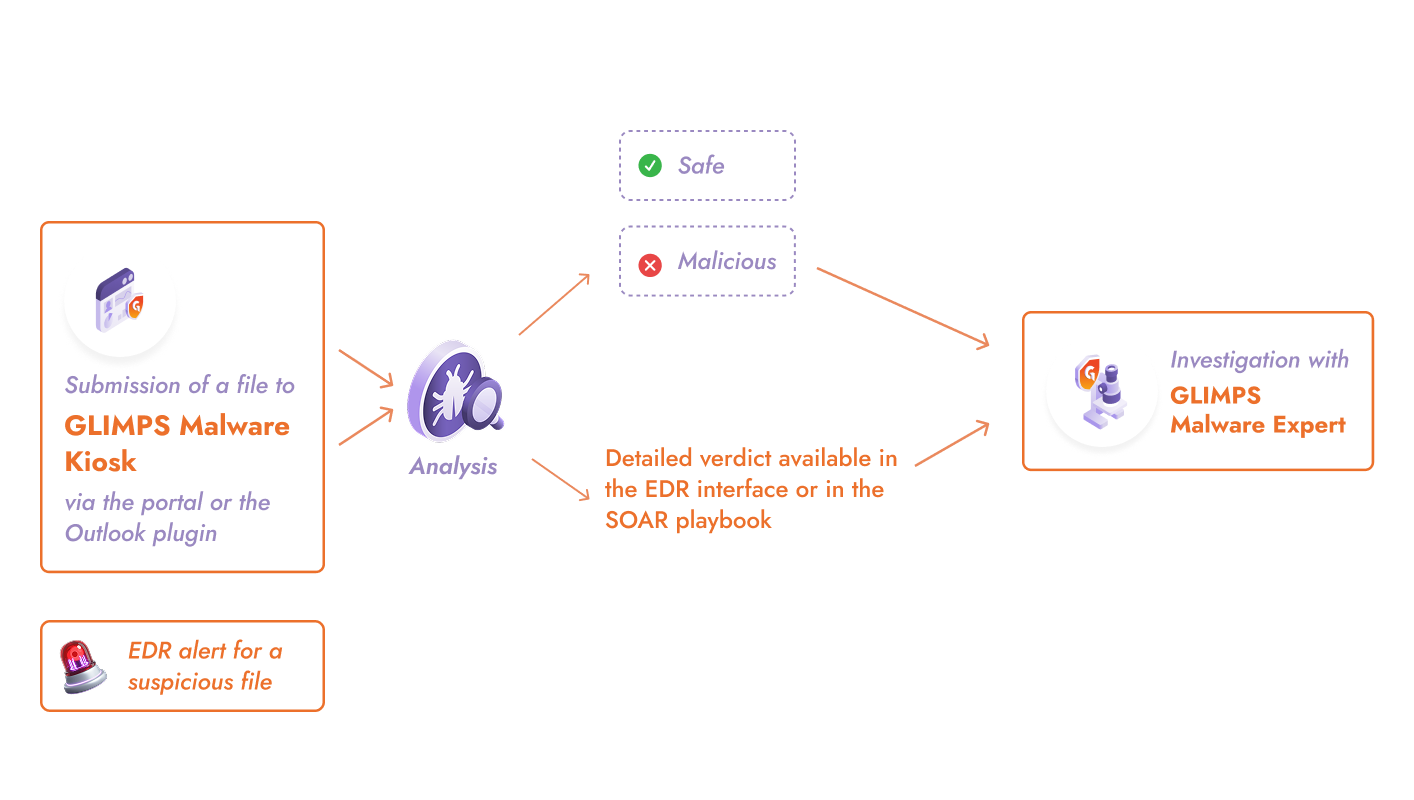
1. Analysis in seconds without human intervention
2. Verdict notified to the requester based on configuration
3. Confirmed threats escalated with IOCs, TTPs, and MITRE ATT&CK mapping
4. Full traceability in GLIMPS Malware Expert
75% reduction in sorting time, allowing analysts to focus on investigation
Automation eliminates the time spent on legitimate files. Your top analysts no longer have to manually retrieve every flagged file. They no longer have to wait for sandbox results or write notifications to confirm that a document is safe.
This freed-up time can be reinvested in high-value activities: investigating confirmed threats, improving detection rules, and threat hunting.
Employees who want to resolve doubts about a file receive an immediate response. This responsiveness builds their confidence in the reporting process and reduces risky behavior resulting from workarounds.
GLIMPS solutions for automating verification

GLIMPS Malware Kiosk
A file submission portal that empowers employees
- Instant feedback, understandable even without cybersecurity expertise
- Customizable interface and messages
- Visibility into files submitted by the security team in GLIMPS Malware Expert
Outlook Plugin
A GLIMPS button directly within Microsoft Outlook to flag and analyse a suspicious email with a single click
- Analysis of attachments and links contained in the email
- Immediate verdict (safe or malicious) without leaving the email client
- No technical expertise required
- Automatic alert to the security team if a threat is detected

GLIMPS Malware Expert
Central platform for monitoring all submissions and investigating detected threats
- Full visibility into scanned files
- 25+ scanning engines (static, dynamic, AI)
- Automatic extraction of IOCs and TTPs
- Secure document preview
- Export to STIX, MISP, PDF, JSON
Day-to-day questions
The analysis runs 24/7. A file submitted at 3 a.m. receives a result within seconds. If a threat is detected, your alerting system notifies the on-call staff according to your configuration. The requester receives a response immediately.
No. Every file scanned via GLIMPS Malware Kiosk appears in GLIMPS Malware Expert. The IT/SOC team can filter by source, time period, or verdict. They retain the ability to investigate any scan in greater detail if necessary. Automation eliminates repetitive tasks, not oversight.
The IT/SOC team is automatically alerted via the configured channels (email, SYSLOG, Splunk). They can then contact the employee, verify whether the file was opened, and initiate the appropriate remediation steps. The analysis context is immediately available for investigation.
For more information on this topic, please visit the GLIMPS Malware for EDR page or review our use case dedicated to incident investigation and response.
Save time by automating the verification process
Measure how much time your IT/SOC team can save by resolving issues.
Request a demo