Simplify suspicious file analysis for your employees
Your employees receive files every day with no way to tell if they’re malicious. Give them a simple tool to analyze those files and clear the doubt in seconds, no IT ticket required, no cybersecurity expertise needed.
Your employees are trained to be cautious, not to act on suspicion
Cyber awareness training is paying off: your employees know a file can be dangerous. But in practice, when they’re faced with a suspicious document, what do they do? Several options, but all problematic.
- Open the file and take the risk: this is the human error behind 90% of compromises.
- Contact IT and wait: that’s lost time for them and an added burden for your teams.
- Ignore the file: that could stall a project or a collaboration.
- Upload it on a public online scanner and breach confidentiality
Without a tool suited to their level, your employees are stuck between vigilance and productivity. Some may end up opening files out of necessity, or simply because they’re tired of waiting.
A portal to easily analyze files, accessible to everyone
What if file verification were accessible to all? A web portal lets any employee submit a suspicious file from their browser, with no cybersecurity knowledge required. Authentication via corporate email, drag and drop the file, verdict in seconds.
The interface displays a result anyone can understand: “safe” or “malicious”, no technical jargon, no interpretation needed.
When a malicious file is detected, a customizable message indicates what to do next based on your internal policy: delete the file, contact IT, do not open. The employee knows exactly how to proceed.
Personal history remains accessible for 7 days and IT teams retain full visibility into analyzed files through the GLIMPS Malware Expert interface, without having been solicited, and can investigate further if needed.
New: The Outlook plugin for scanning files with a single click from your email client
Has an employee received a suspicious email? Thanks to the GLIMPS button integrated into Microsoft Outlook, they can initiate a scan with a single click, without leaving their email client. The plugin automatically submits the attachments and links contained in the email to the GLIMPS Malware scanning engines and displays a clear verdict: safe or malicious. No technical expertise is required. If a threat is confirmed, the alert is automatically escalated to the security team, who can view the full context in GLIMPS Malware Expert to investigate.
Simple analysis in seconds, full traceability
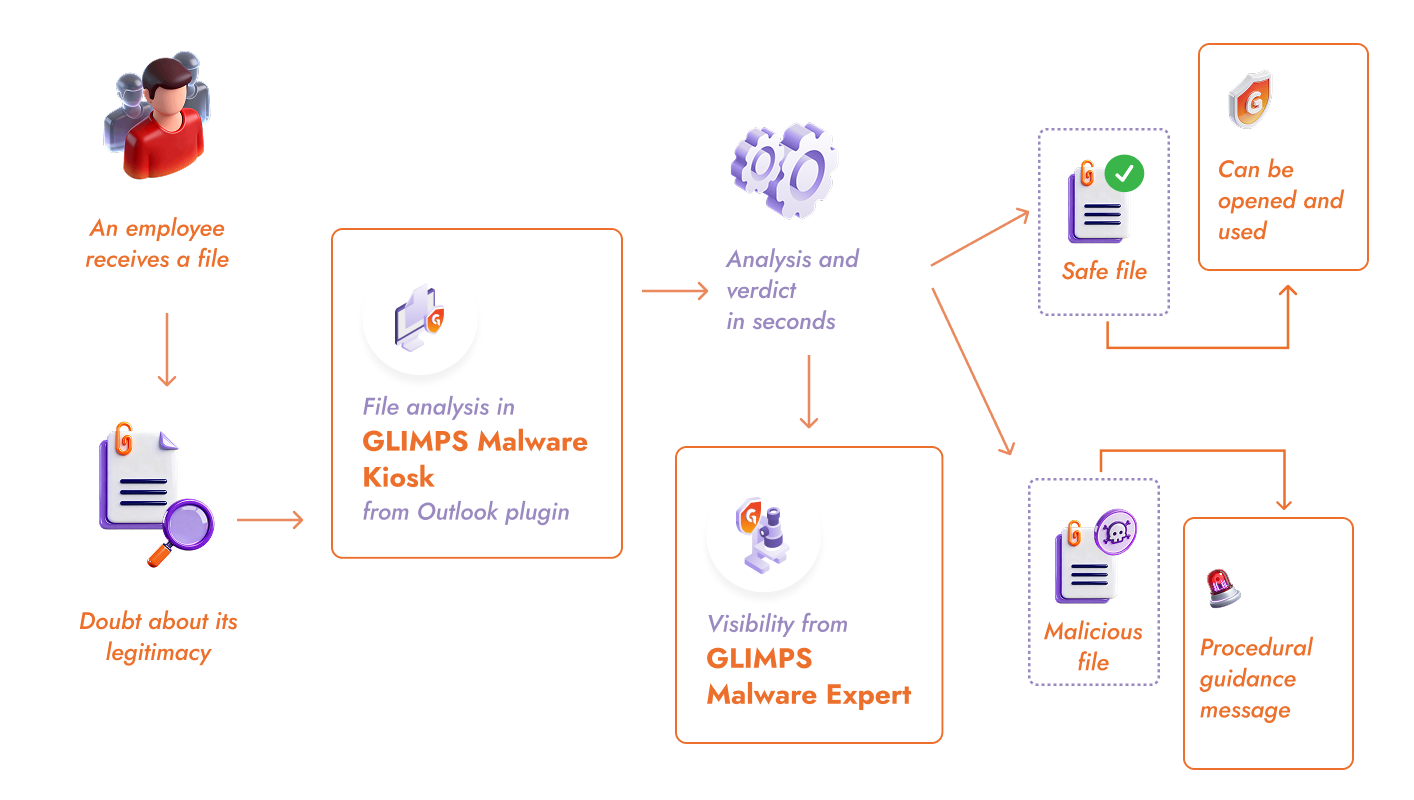
1. Portal accessible from any browser, no installation required
2. Authentication via organization email domain
3. Verdict in seconds, understandable without expertise, with a personnalised instruction message
4. 7-day personal history, full traceability on the IT side
Autonomous employees in the face of suspicious files
By giving every employee the ability to check their files, you change the dynamic. They become an essential link in your company’s cybersecurity posture. No more opening a dubious document out of necessity, verification takes seconds. No more waiting on IT for a file that turns out to be legitimate 90% of the time.
Risky behaviors decrease naturally, and awareness training finally delivers its full potential: your employees have a concrete tool to put best practices into action. They become early warning signals rather than vectors of compromise.
On the IT side, the impact is equally positive. The team is no longer pulled into time-consuming verifications and can focus on real threats, with analysis context available immediately.
The sovereign alternative to public analysis tools like VirusTotal
When faced with a suspicious file, some employees turn to free online services like VirusTotal. The reflex seems logical, but it exposes the company to a major risk: every submitted file is shared with the community and potentially accessible to third parties, including competitors or attackers.
A confidential document, a contract under negotiation, an attachment containing customer data: anything submitted to these platforms is beyond your control. Attackers actually monitor these tools to check whether their malware has been detected.
With an internal portal, your employees get a sovereign alternative that combines detection power with complete confidentiality. Analyzed files are never shared, never reused. It’s this guarantee that led ANSSI to choose GLIMPS for government ministry staff.
“As part of a public contract awarded to GLIMPS in 2022, ANSSI wanted to offer a service enabling ministry staff to verify whether a file received in a professional context is malicious or not, while ensuring the analysis could not be reused by commercial third parties. Behind its simple appearance, the ‘Kiosk’ meets the needs of a broad audience whose cybersecurity skills vary greatly from one person to the next.”
ANSSI
GLIMPS solutions to simplify file analysis
GLIMPS Malware Kiosk
File submission portal that empowers employees to act autonomously:
- Simplified drag-and-drop analysis
- Verdict in seconds, understandable without cyber expertise
- Customizable interface and messages
- Visibility into submitted files for the security team in GLIMPS Malware Expert
Outlook Plugin
A GLIMPS button directly within Microsoft Outlook to flag and analyse a suspicious email with a single click
- Analysis of attachments and links contained in the email
- Immediate verdict (safe or malicious) without leaving the email client
- No technical expertise required
- Automatic alert to the security team if a threat is detected

GLIMPS Malware Expert
Central platform to oversee all submissions and investigate detected threats:
- Full visibility into analyzed files
- 25+ analysis engines (static, dynamic, AI)
- Automatic IOC and TTP extraction
- Secure document preview
- STIX, MISP, PDF, JSON export
Day-to-day questions
We recommend emphasizing speed. When checking a file takes a few seconds and waiting for IT takes hours, the choice becomes obvious. Promote the portal during awareness sessions and integrate it into your security procedures. Early adopters quickly build the habit once they see how simple it is. We provide our clients with a ready-to-use communication kit.
The user sees a clear message indicating the file is dangerous, along with the instructions you’ve defined. In parallel, the IT team receives an automatic alert and can contact the employee to verify whether the file was opened and trigger the appropriate response.
Yes. The portal is accessible from any browser with an internet connection. A sales rep on the road or an employee working from home can check a file just as easily as from the office (no VPN, no special configuration), simply by logging in with their corporate email address.
Give your employees a simple way to verify their files.
Schedule a personalized demo with a GLIMPS expert
Request a demo